A file described as 3000 by 2000 pixels does not yet specify a physical print size. The pixels tell us the number of samples along each side; a pixels-per-inch choice relates those counts to inches. That is why the same pixel dimensions can produce two different size calculations without creating any new image detail. Before paying for a print, make the proposed output size explicit and keep the arithmetic separate from a promise about how the print will look.
Start with two pixel dimensions, not a single quality label
Our original example is a 3000 pixel-wide by 2000 pixel-high rectangular image. It contains 6,000,000 pixels in total, but the side dimensions remain necessary. A different shape could have the same total count and fit a proposed print differently. Calling this a six-megapixel image would therefore shorten the description without answering the size question.
Adobe's printed-image-resolution guidance defines pixels per inch as pixels assigned to each printed inch and distinguishes that density from image dimensions. It explains that, without resampling, changing resolution changes physical dimensions while the image data remains constant. This supplies the basis for the following arithmetic; no printer or photograph was tested for the example.
To find a side in inches, divide its pixel count by the selected pixels per inch. Keep width and height in the same order. The result describes an image rectangle under those stated assumptions, rather than the outer dimensions of a frame, paper margin or finished mounting.
Calculate the same file at two densities
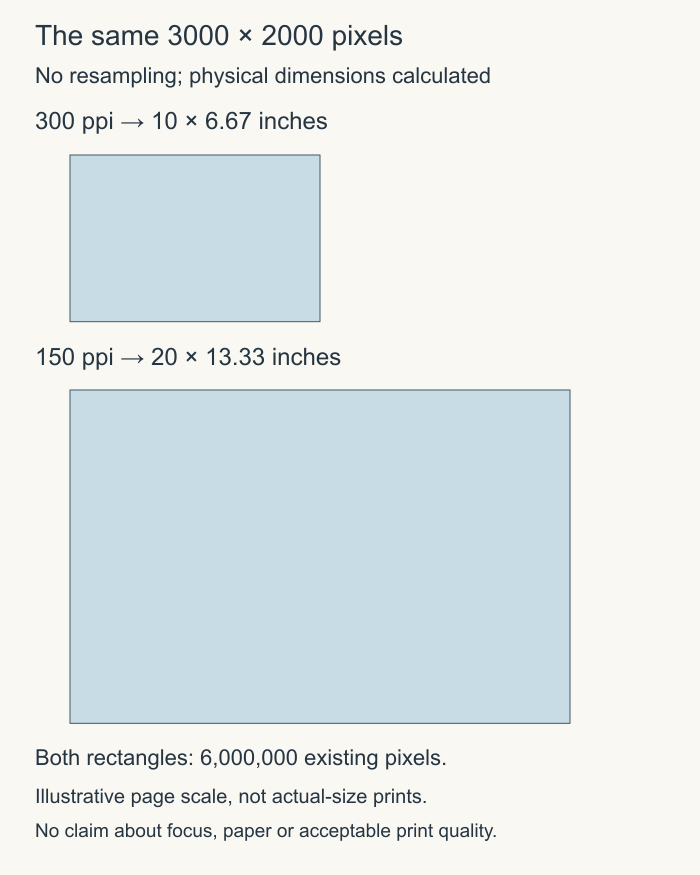
At 300 ppi,the width is 3000 divided by 300:10 inches. The height is 2000 divided by 300:about 6.67 inches. At 150 ppi,the width is 20 inches and the height about 13.33 inches. The lower chosen density produces the larger physical rectangle because fewer of the existing pixels are assigned to each inch.
The total remains 6,000,000 pixels in both calculations. No extra scene detail has appeared in the larger rectangle. Conversely, the smaller rectangle does not prove that the original capture was focused, well exposed or suitable for a particular paper. Size arithmetic cannot inspect qualities absent from the supplied numbers.
The paired rectangles in the original diagram show this relationship at one illustrative page scale. They are not meant to display the final prints at actual physical size on every reader's screen. A browser's zoom or display scaling would make that claim unreliable. The labels, rather than a ruler held against the screen, carry the calculated dimensions.
A ten-by-eight order adds a separate shape question
Now suppose the proposed image area is 10 by 8 inches. Its width-to-height ratio is 1.25,while the original 3000 by 2000 file has a ratio of 1.5. Those are different shapes. At 300 ppi,our original width reaches 10 inches but the height is only about 6.67 inches,so it does not fill a 10 by 8 image area unchanged.
A border can preserve the complete picture while leaving some of that target area unfilled. A crop can fill the area while discarding part of the original shape. Distorting the picture would alter its proportions. These are distinct choices, not competing names for an identical result. Ask the print provider which is proposed and inspect the actual proof.
For a centered crop that keeps the 2000 pixel height and changes only width to a 1.25 ratio,the needed width is 2500 pixels. That removes 500 pixels in total, or 250 from each side if centered. At an 8 inch height,those remaining 2000 pixels imply 250 ppi. This is another declared arithmetic case, not a recommendation to crop a particular composition or a guarantee of quality at that density.
Specify what the provider should deliver
A usable order note can state the actual file dimensions, intended image area, border or crop choice and the proof to approve. Keep paper size separate if it includes margins. A ten-by-eight sheet does not establish that the printed image itself occupies the whole sheet, just as a frame's outside size does not establish its image opening.
If software resamples the file, record that as a separate operation rather than treating an increased pixel count as newly captured detail. The original calculation is useful precisely because it keeps the inputs visible. It can identify a size or shape mismatch before the reader pays, while leaving the actual image, printing process and acceptable result for appropriate inspection.
Sources & further reading
Published sources for the details and examples discussed in this story.